

As internet speeds continue to increase and home networks accommodate higher numbers of connected smart devices, wireless standards must evolve to keep pace. Wi-Fi 7 (802.11be) represents a major leap in wireless networking performance over Wi-Fi 6E (802.11ax), introducing substantial upgrades in speed, latency, and network stability.
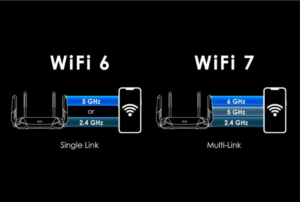
1. Technical Feature Comparison
While Wi-Fi 6E introduced access to the clean 6 GHz frequency band, Wi-Fi 7 expands how that bandwidth is processed and delivered across connected clients.
2. Core Wi-Fi 7 Innovations Explained
Multi-Link Operation (MLO)
-
Wi-Fi 6E: A device can connect to either the 2.4 GHz, 5 GHz, or 6 GHz band at any given time, forcing a band switch when moving or facing interference.
-
Wi-Fi 7: MLO enables a single device to aggregate data streams across multiple frequency bands simultaneously (e.g., combining 5 GHz and 6 GHz). This significantly increases throughput while dropping latency to near-zero levels.
320 MHz Channel Width
-
Wi-Fi 7 doubles the maximum channel bandwidth from 160 MHz (in Wi-Fi 6/6E) to 320 MHz within the 6 GHz spectrum. Wider channels act like multi-lane highways, allowing far more data to pass simultaneously.
4096-QAM (4K-QAM)
-
Quadrature Amplitude Modulation (QAM) dictates how densely data packets are packed into radio signals. Wi-Fi 7 transitions from 1024-QAM (10 bits per symbol) to 4096-QAM (12 bits per symbol), yielding a 20% boost in raw data transfer density.
3. Specifications: Wi-Fi 6 vs. Wi-Fi 6E vs. Wi-Fi 7
| Feature / Standard | Wi-Fi 6 (802.11ax) | Wi-Fi 6E (802.11ax) | Wi-Fi 7 (802.11be) |
| Frequency Bands | 2.4 GHz, 5 GHz | 2.4 GHz, 5 GHz, 6 GHz | 2.4 GHz, 5 GHz, 6 GHz |
| Max Channel Width | 160 MHz | 160 MHz | 320 MHz |
| Max Data Rate | 9.6 Gbps | 9.6 Gbps | 46 Gbps |
| Modulation Scheme | 1024-QAM | 1024-QAM | 4096-QAM |
| Multi-Link Connection | Single-band link | Single-band link | Multi-Link Operation (MLO) |
| Latency Target | < 20 ms | < 10 ms | < 2 ms (Ultra-low latency) |
4. Should You Upgrade Your Router?
Determining whether to upgrade depends on your existing setup, internet service tier, and device hardware:
                            Decision Matrix

                 Do you currently own a Wi-Fi 6E router?
                               │
            ┌──────────────────┴──────────────────┐
            ▼                                     ▼
           YES                                   NO
            │                                     │
 Does your ISP speed exceed 2.5 Gbps?      Do you have Wi-Fi 7 client devices?
     ┌──────┴──────┐                           ┌──────┴──────┐
     ▼             ▼                           ▼             ▼
    YES           NO                          YES           NO
     │             │                           │             │
  [UPGRADE]   [KEEP 6E]                    [UPGRADE]   [WAIT / KEEP 6]
Who Should Upgrade Now
-
Multi-Gigabit Broadband Subscribers: If your internet plan offers speeds exceeding 2.5 Gbps or 5 Gbps, a Wi-Fi 7 router with 10 Gbps Ethernet WAN/LAN ports ensures you aren’t bottlenecked by Wi-Fi.
-
Competitive VR & Real-Time Gamers: Applications like wireless Virtual Reality (VR) streaming or cloud gaming require ultra-low latency that MLO natively delivers.
-
Tech Enthusiasts with Modern Devices: Flagship smartphones, laptops, and motherboards equipped with Wi-Fi 7 network cards can immediately utilize MLO and 320 MHz channels.
Who Should Hold Off
-
Current Wi-Fi 6E Owners: If your home network runs smoothly on a Wi-Fi 6E router and your ISP connection is under 1 Gbps, upgrading to Wi-Fi 7 will yield minimal noticeable performance gains for daily tasks like 4K streaming or browsing.
-
Networks with Older Client Devices: Wi-Fi 7 is backward-compatible, but older client hardware (phones or laptops limited to Wi-Fi 5 or Wi-Fi 6) cannot benefit from Wi-Fi 7 features like 4K-QAM or MLO.